Today
A tap a day. That's it.
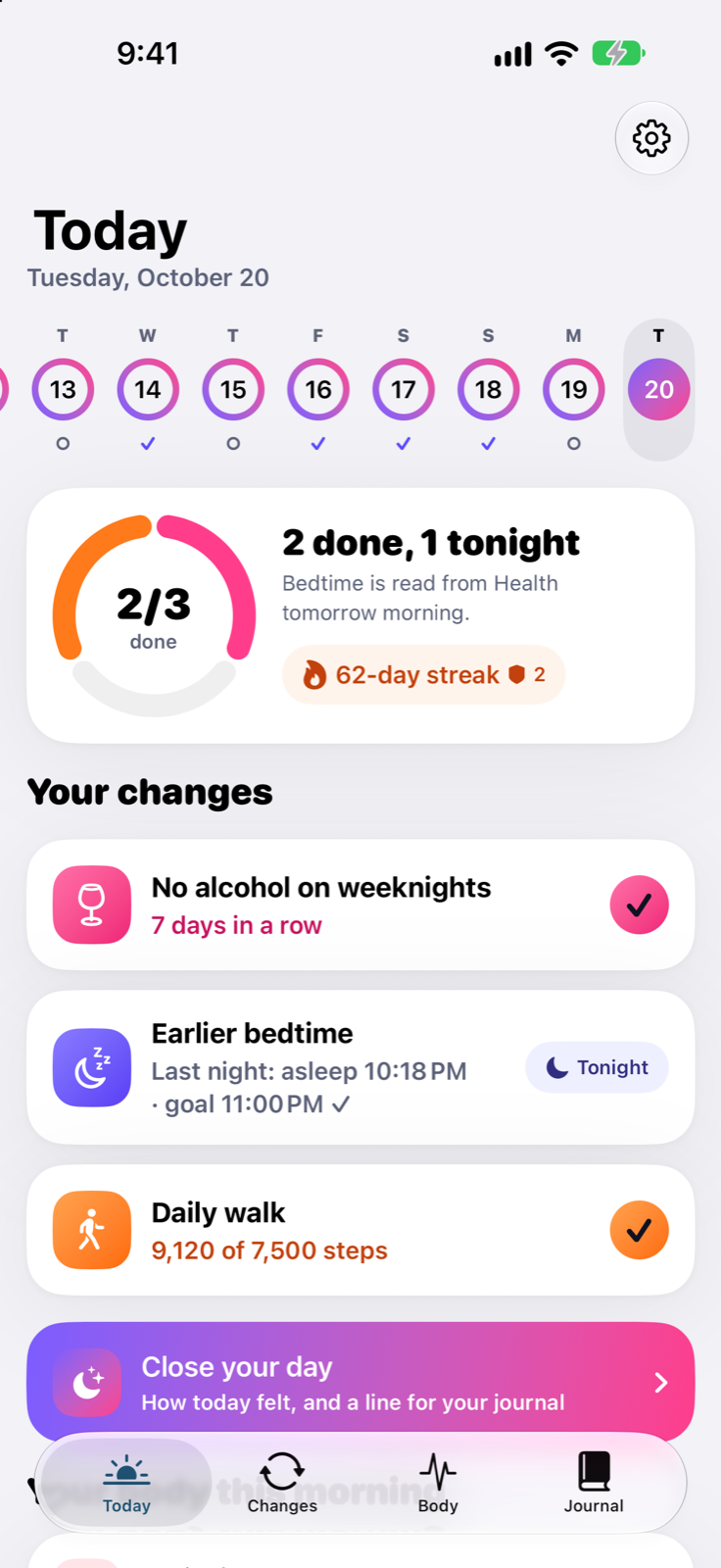
Every running change on one screen with a progress ring and your streak. Health-counted changes fill themselves in, and a quick “Close your day” check-in is there if you want it.
Habit tracker for iPhone and Apple Watch
Tervy is a habit tracker for health changes like an earlier bedtime, weeknights without alcohol or a daily walk. Mark each one in a tap a day, and see what your sleep, resting heart rate and steps did meanwhile, in plain words.
 Coming soon to the App Store
Sample data
Pick a ready-made start or name your own. A heart means Apple Health counts it for you, so it needs no tap at all.
How it works
Three steps, then Tervy mostly runs itself. Most body signals move slowly, so the habit side gives you something to see from day one.
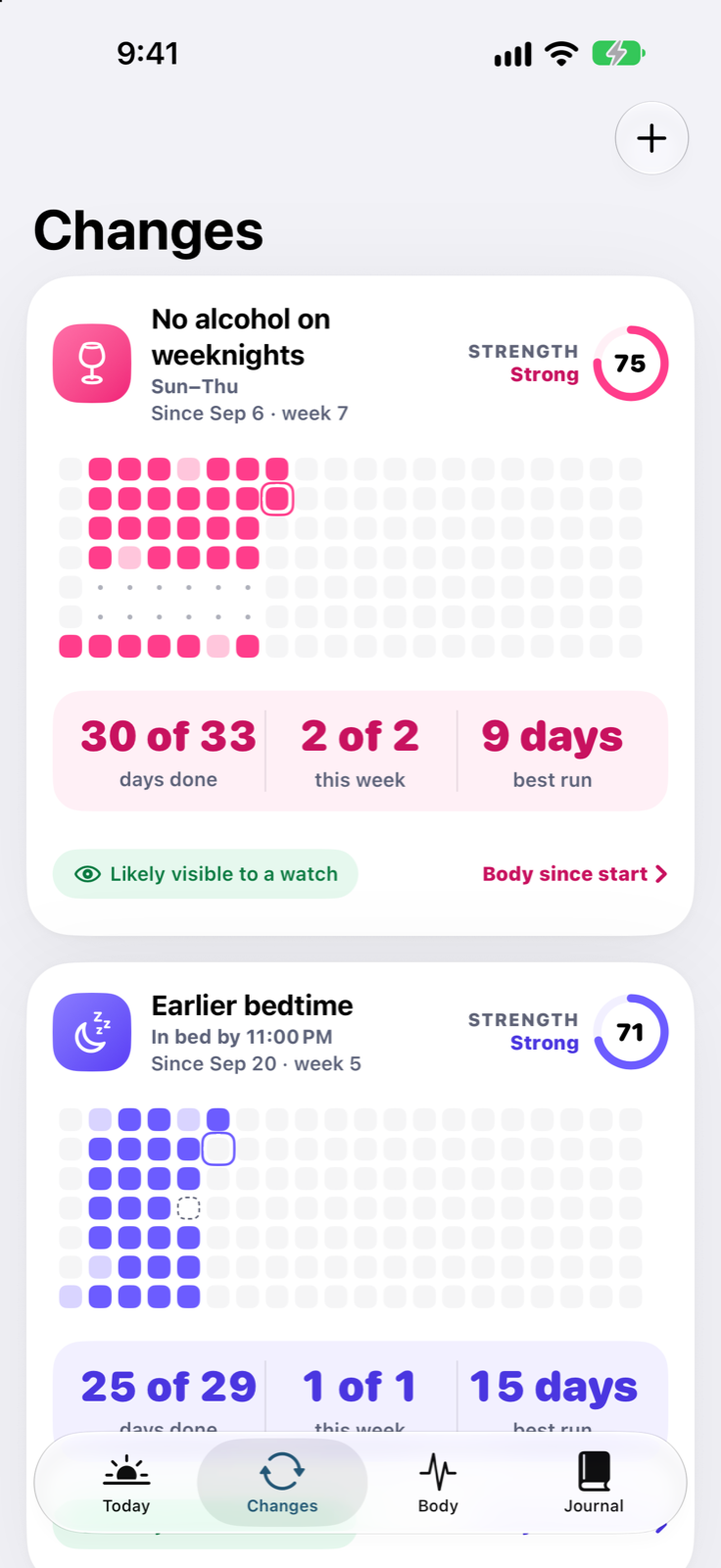
Choose a ready-made start (Earlier bedtime, No alcohol on weeknights, Daily walk, No coffee after noon) or name your own. Set a target and the days it runs.
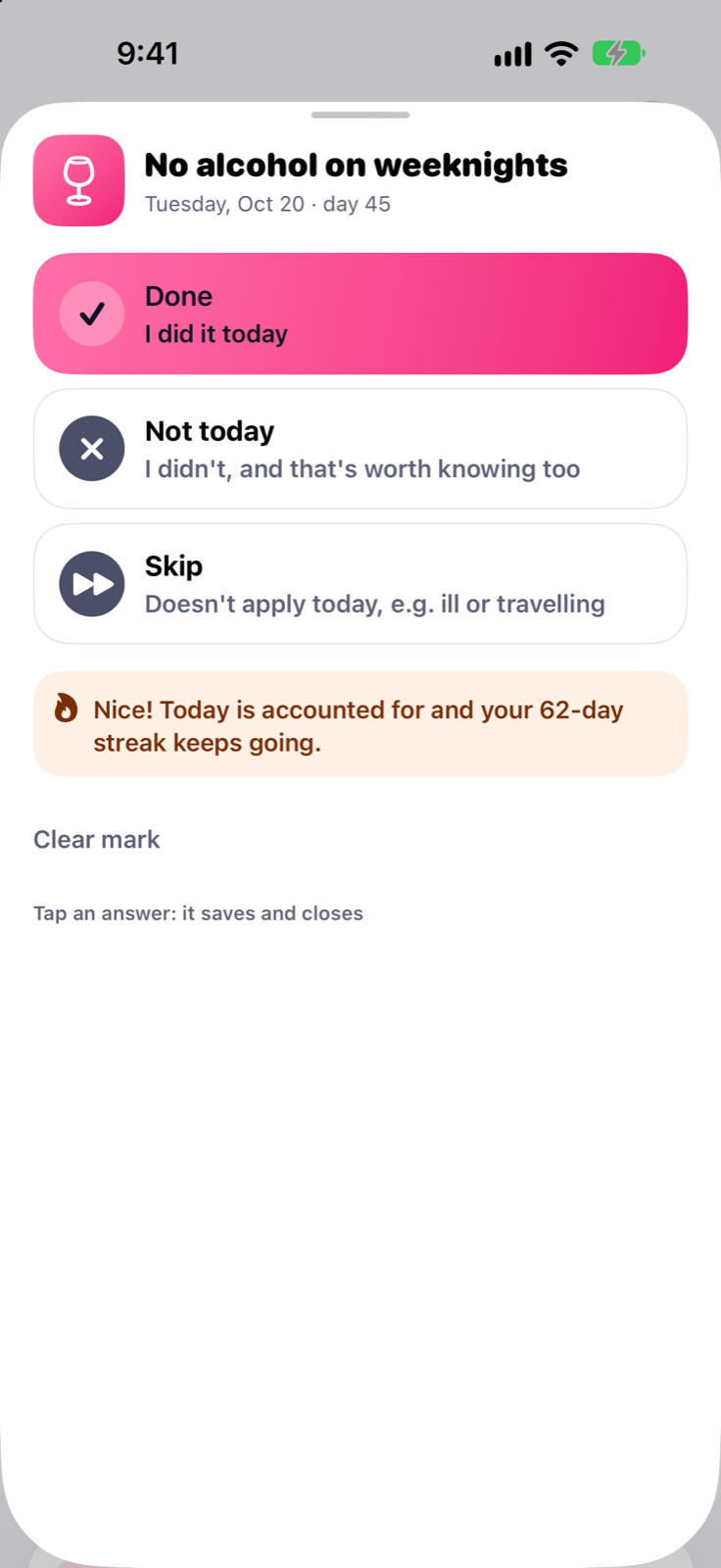
Done, Not today or Skip, from the app, a widget or your Apple Watch. Bedtime, sleep and steps are counted from Apple Health, so some days need no tap at all.
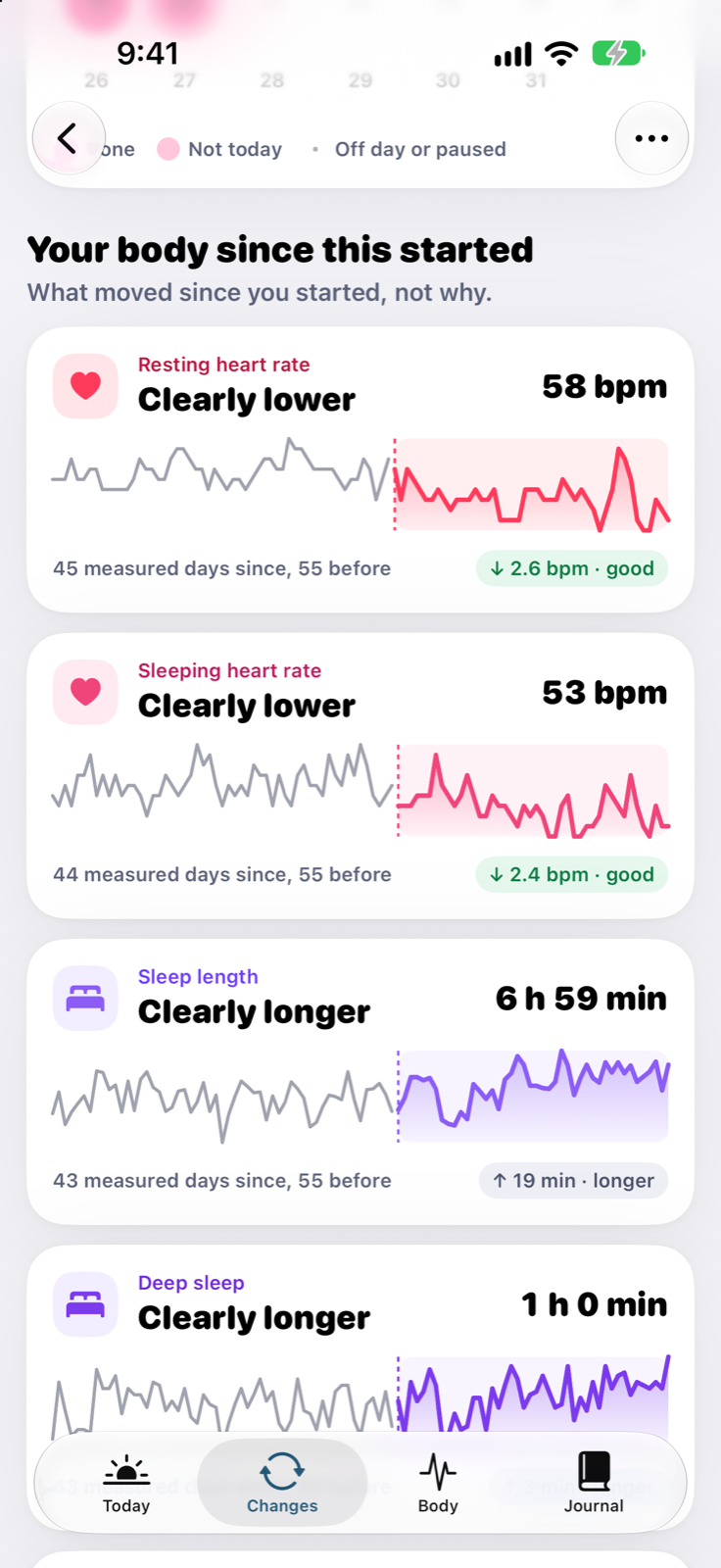
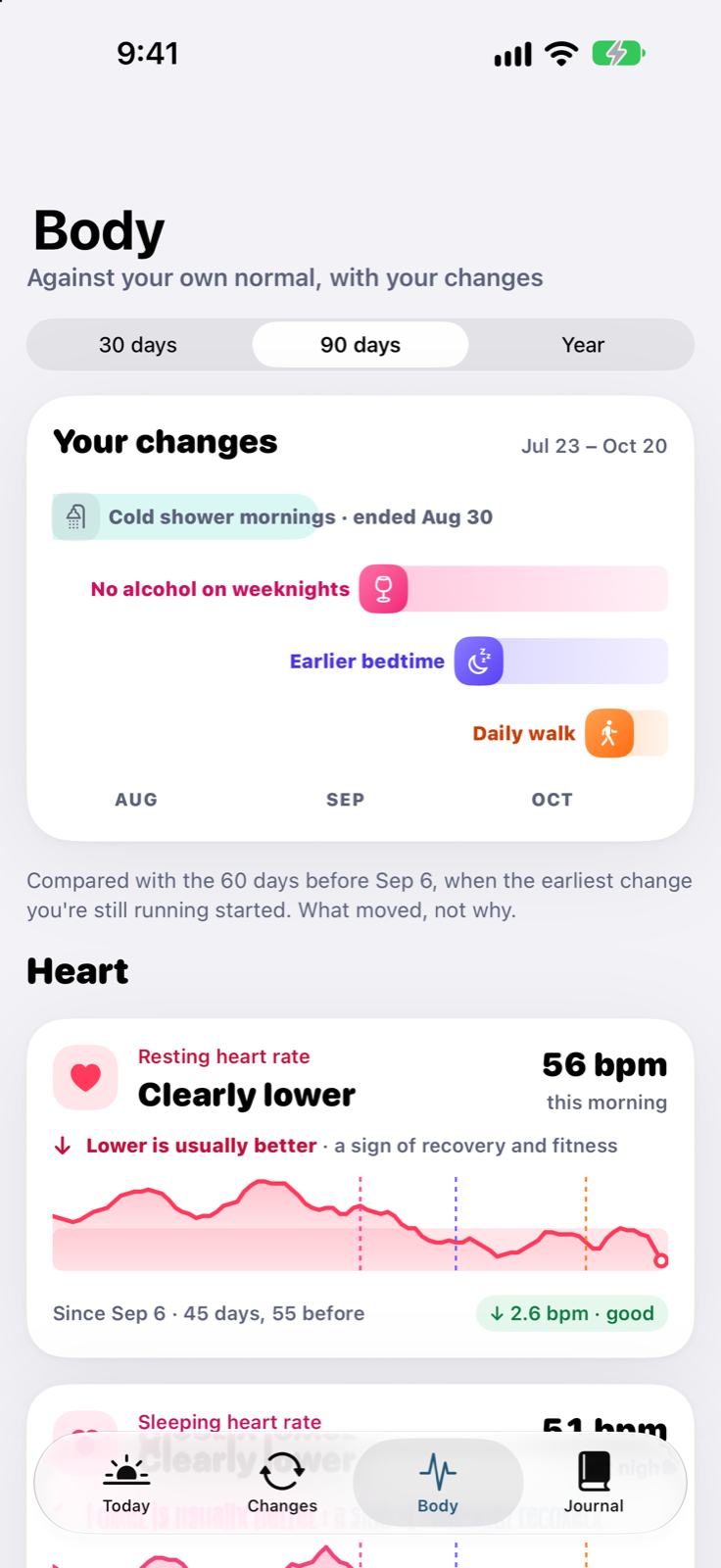
After a couple of weeks, each change shows your resting heart rate, sleep and more since it started, against the weeks before. In words first, numbers second.
The whole picture
Three lanes on one timeline, never added up into one number. You see them side by side, and you decide what they mean.
What you did
Done Not today Skip Off day
How you felt
Your own rating of each day
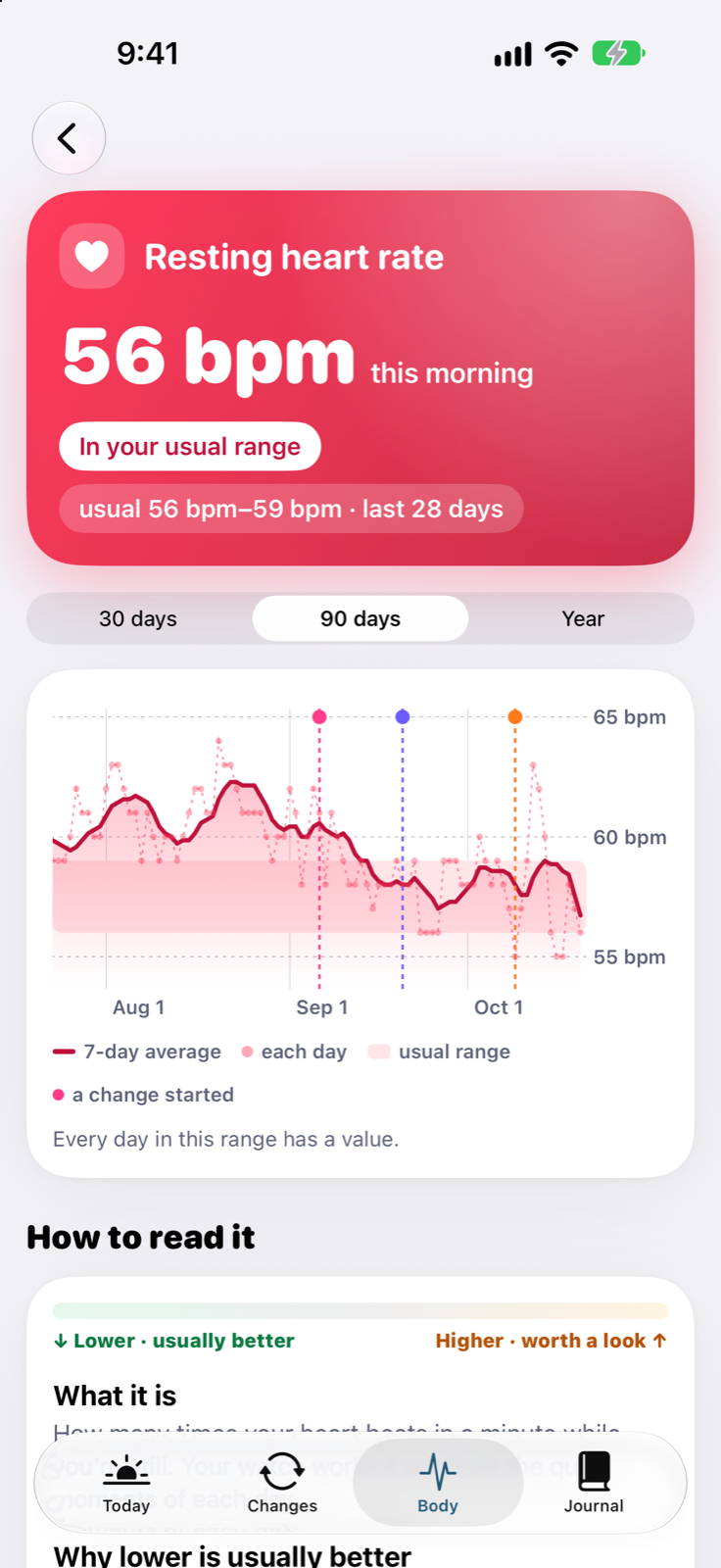
Resting heart rate
Each morning 7-day average Your usual range
↓ Lower is usually better
Features
Colourful, quick and forgiving on the habit side. Careful and plain-spoken on the body side.
Today
Every running change on one screen with a progress ring and your streak. Health-counted changes fill themselves in, and a quick “Close your day” check-in is there if you want it.
Grids and strength
A habit grid and a strength ring for every change. Strength is forgiving: one missed day dents it, it doesn't wipe it out. Best runs and weekly counts sit right underneath.
Your own normal
Every signal is described against your own recent weeks: in your usual range, higher, lower. The number comes second, and no reading is judged on a single day.
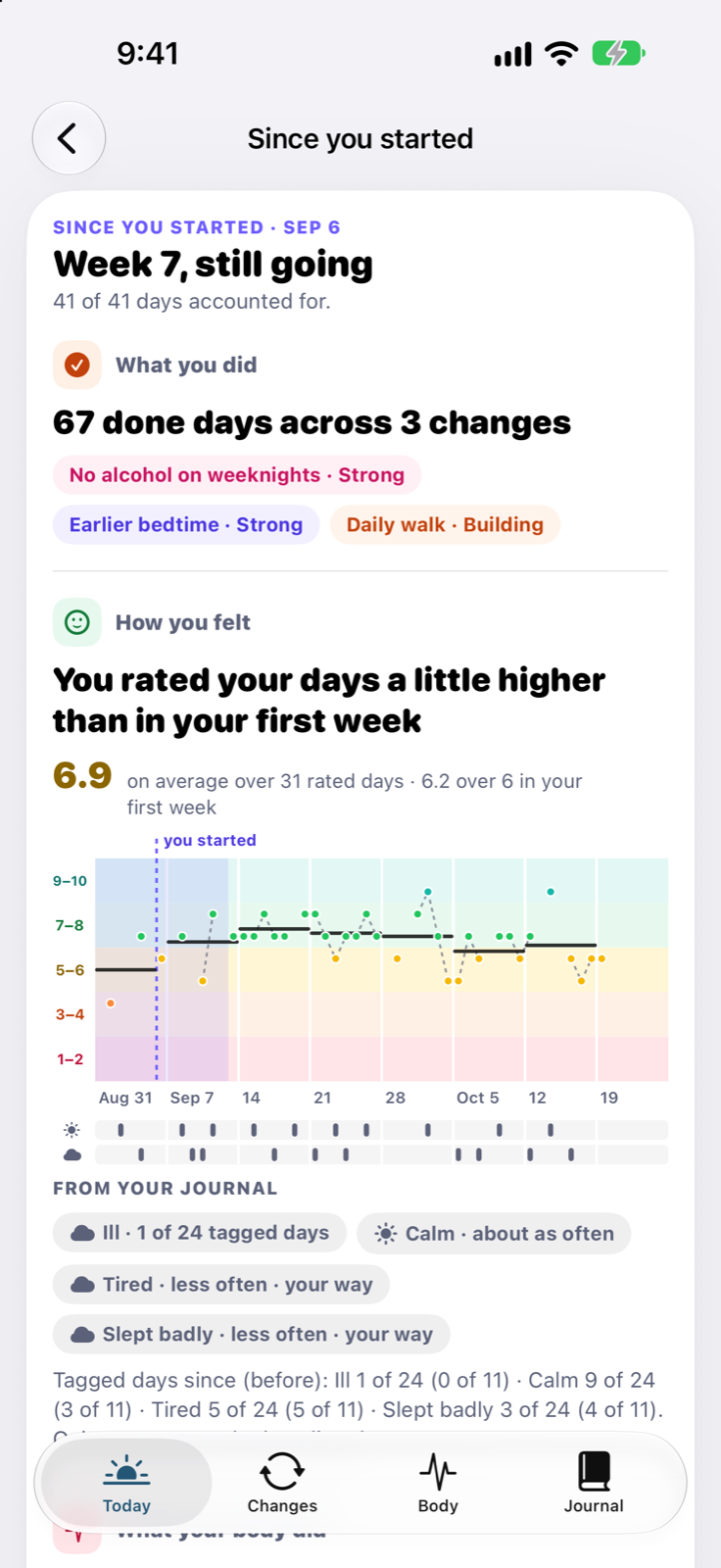
Since you started
Done days across your changes, how you rated your days, and which body signals moved since you started, each in its own lane, with the counts behind it.
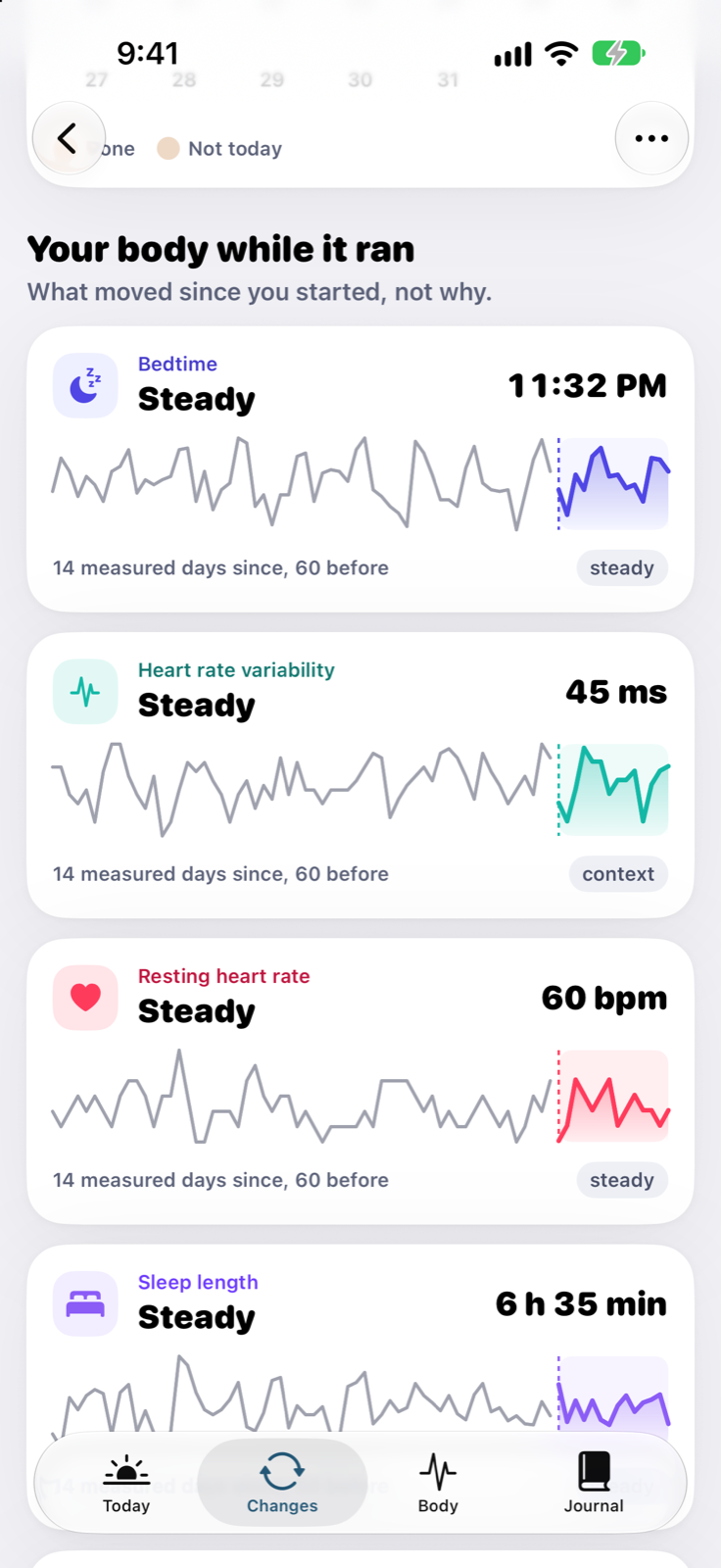
Honest answers
When your body stayed steady, Tervy says steady. A null result is still an answer, and it makes the times something did move worth believing.
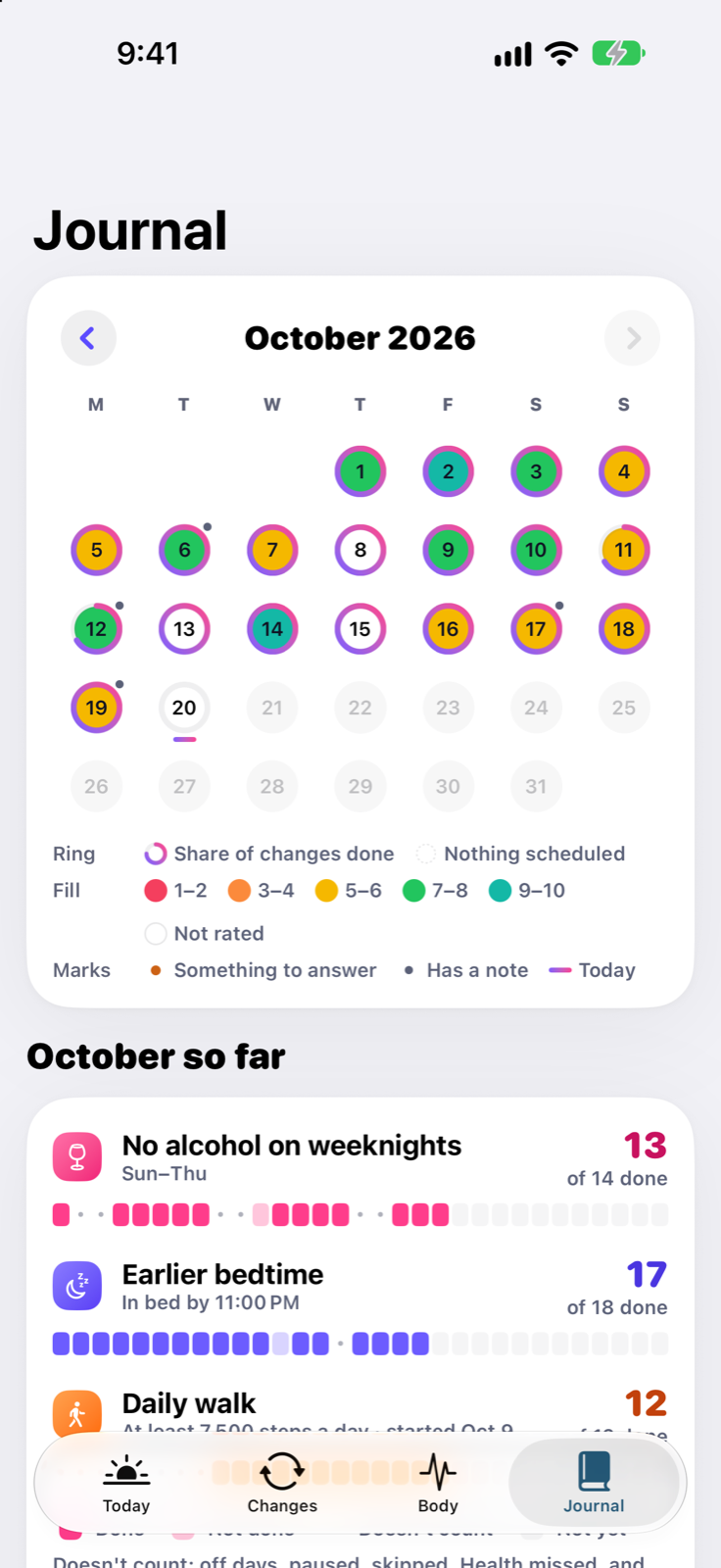
Journal
A calendar of your days coloured by how they felt, each change's month at a glance, notes and tags you can search. Your own record, exportable any time as CSV or JSON.
Body
Resting and sleeping heart rate, sleep length and bedtime, steps, daylight, VO2 max and more, drawn under bands that show when each change ran.
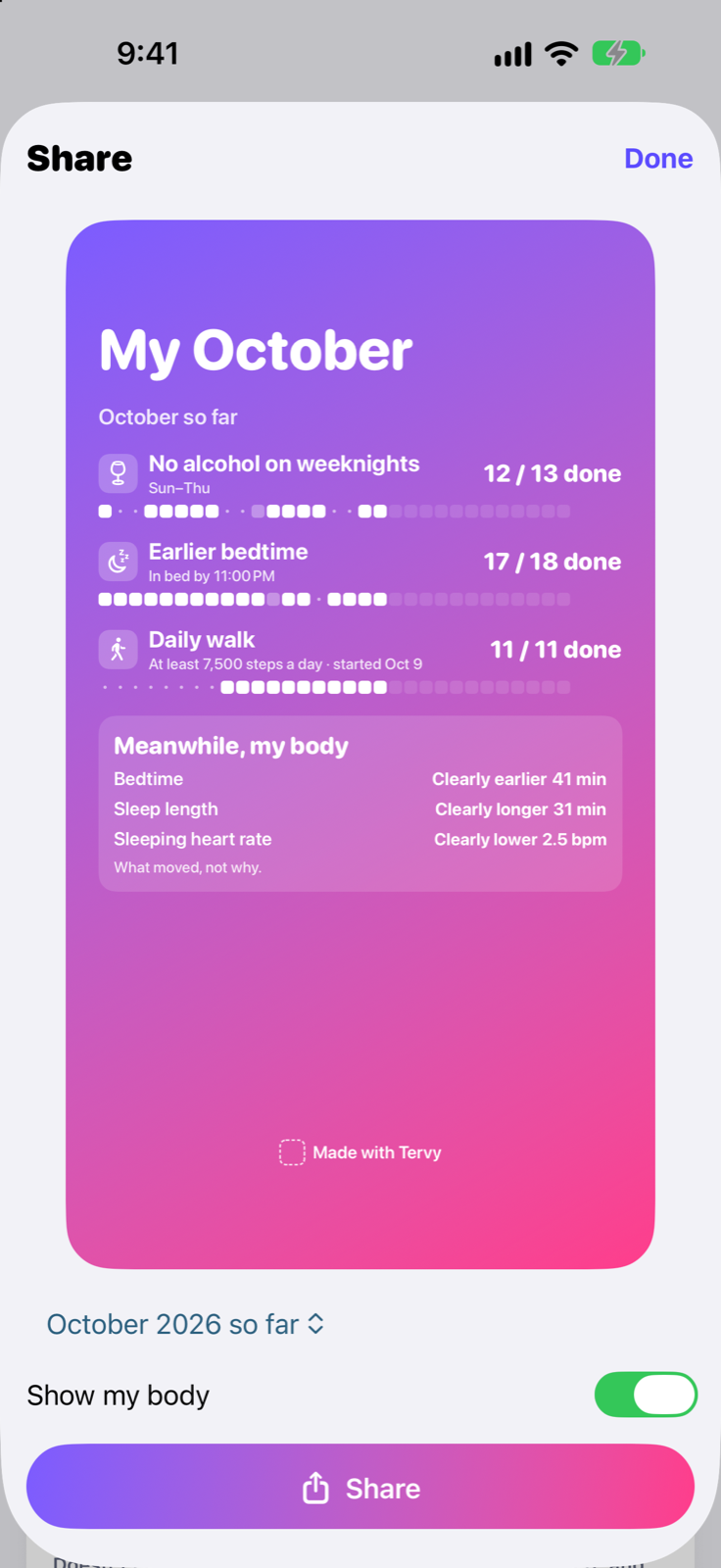
Share
A share card of what you did this month, with your body's side added only if you switch it on.
Sample data
Honest by design
These rules are written into the app and checked by its tests. They're the reason you can believe it when it does say something moved.
Tervy shows when each change started and what each signal did since. It never says which change caused it. You changed other things too, and only you know which.
“Clearly lower”, “in your usual range”, “steady”. Always against your own recent weeks, never against a population average.
No signal is judged until there are enough measured days, and a change needs enough days of its own plus history from before it. Until then, Tervy says it's too early.
A night your watch didn't record is shown as a gap, never filled in or smoothed over.
Heart rate variability from a wrist swings a lot from day to day. Tervy shows it, and never calls it good or bad.
Streaks and strength are about what you did. A body number never feeds a score, a badge or a celebration.
Apple Watch, widgets, Shortcuts
No ring to buy, no strap, no new habit of wearing something. Tervy reads what your Apple Watch already records in Apple Health, and lets you mark your changes right from your wrist.
Privacy
Tervy reads Apple Health on your device and works everything out there. There is no account to create and no Tervy server that stores your health history.
Nothing to sign up for. Open the app and start.
Baselines, ranges and comparisons are calculated on your iPhone.
Your health data isn't shared with advertisers or data brokers. Ever.
Export every change, answer, note and daily Health value as CSV or JSON.
To learn which screens get used, the app sends anonymous events. Never health values, notes, ratings or change names.
Who it's for
You know what you should change. You want to know whether it's doing anything before you give up on it.
Earlier bedtime · No coffee after noon · Daily walk
Your Apple Watch has years of data. You want it in plain words, against your own normal, with no score telling you how to feel.
Any change, with the full body timeline
Weeknights off, a dry month, fewer drinks. Alcohol is one of the changes a watch tends to pick up most clearly.
No alcohol on weeknights · Less alcohol
Kids, shifts, travel. You need a tracker that counts “Skip” as an honest answer, not a broken streak.
Daily walk · Drink more water · Earlier bedtime
New year, new job, a turning point. Start one change at a time and keep a record of the whole run.
Any of them, one at a time
Why Tervy
Habit trackers count the doing but can't show your body. Readiness apps score your body but don't know what you changed. Tervy puts both on one timeline.
| Habit trackers | Readiness and recovery apps |  Tervy | |
|---|---|---|---|
| Tracks the habit itself | Yes | Some, as a journal | Yes, in one tap a day |
| Shows your body alongside | No | Yes | Yes, from Apple Health |
| Gives you a daily score | No | Yes | No. Words against your own range |
| Tells you what a habit did to your body | — | Some do | Never. It shows what moved, not why |
| Missed day | Often resets the streak | — | Not today and Skip keep it |
| Hardware | None | Often its own ring or strap | The Apple Watch you own, or none |
A general comparison of the app categories, not of any single product.
Who makes it
Tervy is made by Jiří Urbášek, an independent iOS developer from Czechia with many years of building apps for Apple platforms.
Tervy exists because the apps around it each answer half the question. Habit trackers count streaks and ignore your body. Readiness apps score your body and ignore what you changed. Tervy shows both on one timeline, and is honest about what a watch can and can't tell you.
No investors, no ads, no data business. Questions and ideas go straight to the person who builds it.
— Jiří Urbášek, maker of Tervy
Tervy is a habit tracker for iPhone and Apple Watch, built for health changes: sleep, alcohol, caffeine, movement, water, daylight, meditation and anything else you want to try. You start a change, mark it Done, Not today or Skip in one tap a day (or let Apple Health count it), and Tervy puts what you did, how your days felt and what your body did on one timeline. It reads resting heart rate, sleep, steps and many other signals from Apple Health and describes each one against your own usual range. It never claims which change caused what, and it says so when nothing moved. Everything is worked out on your iPhone, with no account.
No. Tervy works as a habit tracker on iPhone alone. The body timeline needs data in Apple Health, which usually comes from an Apple Watch, though Oura and other wearables work too if they write to Apple Health. Some signals, like steps, also come from the iPhone itself.
No, and that's on purpose. Tervy shows when each change started and what each body signal did since, against the weeks before. It never claims that a change caused a movement, because a watch can't know what else changed in your life. You see the facts side by side and decide.
No. There is no daily score telling you how ready you are. Each signal is described in words against your own usual range, worked out from your own recent weeks, with the number second.
Any change you want to try. Ready-made starts cover sleep and bedtime, alcohol, caffeine, walking, movement and strength training, water, daylight, screens, meditation, cold showers, smoking and a new medication or supplement. A change can be yes/no, an amount with a target (“at least” or “at most”), or counted from Apple Health automatically, on every day or only on the days you choose.
Resting heart rate (the main one), sleeping heart rate, walking heart rate, heart rate variability, sleep length, deep and REM sleep, bedtime, steps, exercise minutes, workouts, daylight, VO2 max, breathing rate, blood oxygen, wrist temperature, body weight, mindful minutes and drinks. You choose what to share in Apple Health's permission screen.
Any honest answer keeps it. Done, Not today and Skip all count as accounting for the day, so a rough day or a day off doesn't end your run. Streak shields cover the occasional day you forget to answer at all.
Usually a few weeks. Tervy waits until it has enough measured days of a signal and of the change, plus enough history from before the change started. If the difference is smaller than your normal day-to-day swing, Tervy says there's no clear difference rather than guessing.
On your iPhone (and your Apple Watch, for marks made there). Tervy reads Apple Health on your device and calculates everything locally. There is no account and no Tervy server that stores your health data, and you can export all of it as CSV or JSON.
No. Tervy is a habit tracker and a personal record. It doesn't diagnose, treat or prevent any condition, and it isn't a substitute for advice from a doctor.
iPhone, with a companion app for Apple Watch. The App Store listing shows the current system requirements. Tervy is in English for now.

Pick one thing. Mark it once a day. See what your body did meanwhile.
Coming soon to the App Store